What is Invoice Processing? – Steps, Challenges, Benefits, & Automation
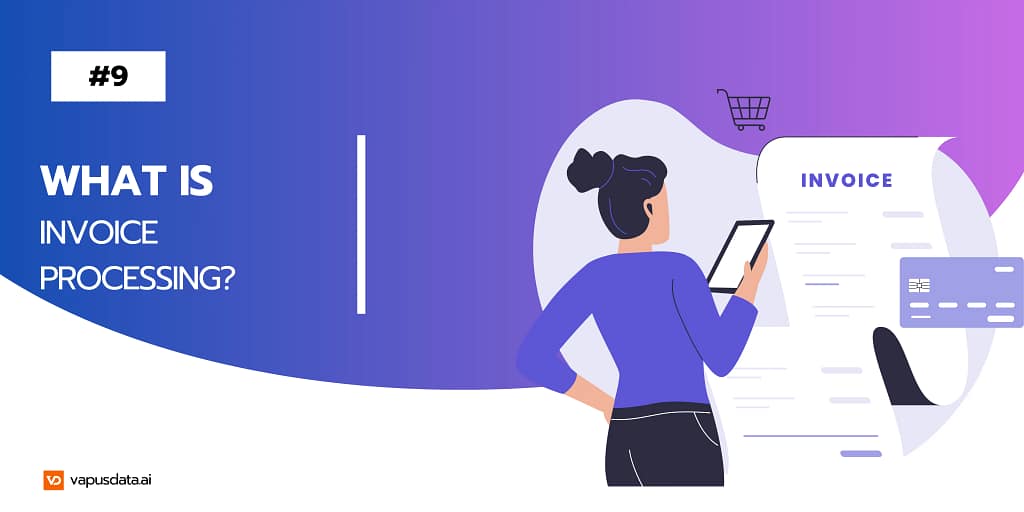
If you are in Finance, you and your team might know this feeling – a vendor follows up on a payment, and someone spends the next hour tracing an invoice through email chains, spreadsheets, and approval queues. According to Ardent Partners’ 2025 data, companies without best-in-class automation spend an average of $12.88 per invoice on manual processing – and take an average of 17.4 days to process it. Multiply that across hundreds of vendors monthly, and the inefficiency becomes impossible to ignore. Now let’s first of all understand what is Invoice Processing.
What Is Invoice Processing?
Invoice processing is a business function carried out by the accounts payable (AP) department. It covers the complete lifecycle of a vendor invoice – from the moment it arrives to the point it gets paid and recorded in the general ledger (GL).
In practice, this means verifying invoice details, matching them against purchase orders, routing them for internal approval, executing payment, and archiving the transaction for audit purposes. When done manually, this process is slow and error-prone. When automated, it becomes one of the most reliable workflows in a finance operation.
Invoice processing sits at the core of AP automation. It is, in fact, the function that AP automation is most directly built to improve. When organisations talk about automating their accounts payable operations, they almost always start here — because streamlining invoice processing is where the biggest gains in cost, speed, and accuracy show up first.
Read More about AP Automation
Invoice Processing Steps
While every organization structures its AP workflow differently, the core steps remain consistent:
- Invoice receipt — The AP team receives the invoice via email, mail, or a vendor portal and logs it into the system.
- Invoice verification — The team checks for accuracy: vendor details, invoice number, line items, tax information, and payment terms.
- PO matching — The invoice is matched against the original purchase order and, where applicable, the goods receipt and contract.
- Approval routing — The verified invoice moves to the relevant internal stakeholders for sign-off.
- Payment processing — Once approved, payment is scheduled and executed via the vendor’s preferred method – bank transfer, ACH, or cheque.
- GL recording — The transaction is posted to the general ledger, the AP balance is updated, and a payment confirmation is sent to the vendor.
Challenges in Invoice Processing
As a company works with more vendors, processing invoices may get more complicated. The following are some typical difficulties that businesses encounter:
- Inconsistent invoice formats create the first bottleneck. Vendors use different layouts, currencies, and data structures. Extracting clean, accurate information from each one requires significant manual effort – and leaves room for data entry errors that compound downstream.
- Approval delays are the second major pain point. An invoice requiring sign-off from two department heads and a finance controller can sit idle for days if one approver is unavailable and no one has visibility into where things stand. Without a centralised tracking system, invoices simply disappear into inboxes.
- Duplicate and fraudulent payments are a genuine risk in high-volume AP environments. When matching is done manually, the same invoice can slip through twice – especially during periods of high transaction volume or staff turnover.
- Audit readiness is another persistent challenge. Managing hundreds of vendor invoices, credit notes, and remittance records manually makes audit preparation a slow, stressful exercise. Teams often scramble to reconstruct paper trails that a proper system would have maintained automatically.
Best Practices of Invoice Processing
Building a reliable invoice processing workflow starts with structure. Finance teams that handle AP well typically follow a few consistent principles.
Standardise your intake process. Choose one channel for invoice submission – ideally a dedicated AP email or vendor portal — and communicate it clearly to all vendors. Fragmented intake (some by email, some by mail, some by fax) is one of the leading causes of lost and delayed invoices.
Define approval hierarchies upfront. Every invoice type should have a clearly documented approval chain. When approvers change or are unavailable, there should be a documented escalation path – not a scramble to find out who’s responsible.
Verify before approving. Before any invoice moves to the approval stage, it should be checked for the correct invoice number, PO reference, vendor details, tax information, and payment terms. Catching errors early prevents costly rework and dispute resolution later.
Automate what doesn’t need a human decision. Data capture, GL coding, PO matching, and payment scheduling are all processes where software outperforms manual effort – faster, more accurate, and without fatigue.
Benefits of Automated Invoice Processing
Automating invoice processing frees your AP team from repetitive, low-value work and gives finance leadership the visibility it needs to make informed decisions.
The financial case is straightforward. Organisations that automate AP report processing costs dropping to under $3 per invoice — compared to the $15–$40 range for manual workflows, according to Ardent Partners research. Beyond cost savings, automated systems dramatically reduce processing time, enabling teams to capture early payment discounts that manual workflows consistently miss.
The operational benefits go further. Real-time dashboards give finance teams live visibility into outstanding liabilities, pending approvals, and upcoming cash outflows. That data supports more accurate cash flow forecasting and tighter working capital management. Automated audit trails mean every invoice action is timestamped and retrievable — making compliance reviews significantly less painful.
Save Time and Money by Automating Invoice Processing:
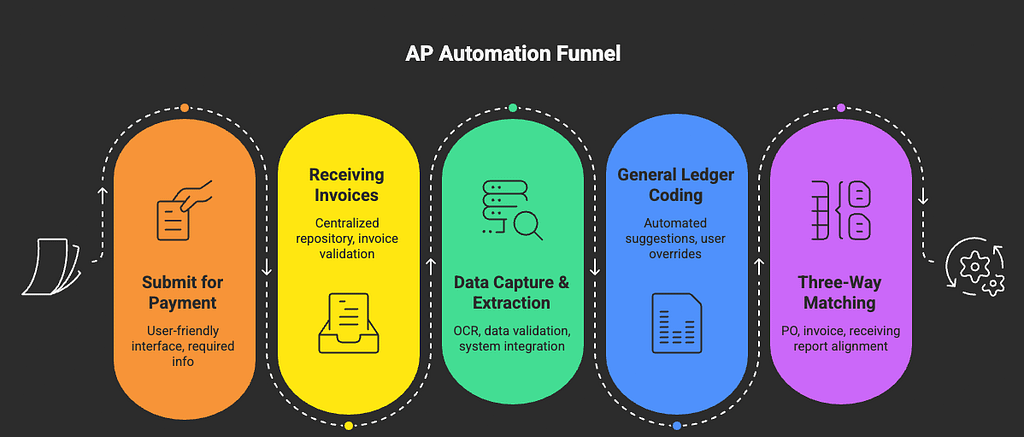
Automation isn’t a binary switch. Invoice processing is made up of several distinct steps — some of which genuinely require human judgment, and others that are simply ripe for automation. Vapusdata handles the full spectrum, embedding intelligent automation at every stage of the invoice lifecycle.
Receiving Invoices
Invoices still arrive through multiple channels – email, vendor portals, mail, and sometimes fax. Vapusdata centralises all incoming invoices into a single intake system, regardless of source. This eliminates the manual sorting and scanning burden on your AP team and ensures no invoice gets lost between departments.
Data Capture and Extraction
Once received, Vapusdata’s AI-powered extraction engine reads and captures invoice data automatically – header fields, line items, tax details, and vendor information – with high accuracy and no manual keying. This removes one of the most error-prone steps in the entire process and gives your team time back for higher-value work.
General Ledger Coding
Vapusdata syncs directly with your financial system via API integration. As invoices are captured, the platform automatically assigns the correct GL codes based on your existing chart of accounts and historical coding patterns. Your AP team reviews and confirms rather than manually coding every line.
Four-Way Matching
Where traditional three-way matching cross-references the invoice, purchase order, and goods receipt, four-way matching adds a fourth document – the contract as well. Vapusdata automates this entire matching process, flagging discrepancies automatically and reducing the risk of fraudulent or duplicate payments slipping through undetected.
Routing and Approvals
Vapusdata’s intelligent routing engine aligns with your existing approval workflows and sends each invoice to the correct approvers in the correct sequence – automatically. All approvals, comments, and decisions happen on top of the invoice itself, so there are no separate email threads to trace. If an approver is unavailable, the system reroutes based on predefined escalation rules, keeping the process moving without manual intervention.
Submitting for Payment
Once an invoice clears all approval stages and internal controls, Vapusdata pushes it directly into your accounting system for payment processing. Payment confirmations sync back automatically, the AP balance updates, and the invoice is archived with a complete audit trail – all without your team touching it again.
Improving AP Invoice Processing Efficiency
For AP teams, efficiency isn’t about eliminating people – it’s about eliminating the backlog. The real cost of slow invoice processing isn’t just late payment fees. It’s the hours your team spends on manual data entry, the cash flow blind spots from delayed GL postings, and the vendor relationship friction that builds over time when payments are unpredictable.
Vapusdata directly addresses all of these. By automating the repetitive steps and surfacing the exceptions that actually need human attention, it gives AP teams the capacity to operate as a strategic function – not just a processing centre. Finance leaders gain real-time visibility into cash positions. Vendors get paid on time. And your team stops drowning in paper.
FAQs
A: Invoice processing is the end-to-end accounts payable workflow that manages vendor invoices from receipt through payment and final recording in the general ledger
2. What are the main steps in invoice processing?
A: The core steps are invoice receipt, data verification, PO matching, approval routing, payment execution, and GL recording. Automated systems handle most of these steps without manual input.
3. What is the biggest benefit of automating invoice processing?
A: The most immediate benefit is cost reduction — automated processing costs a fraction of manual workflows. The longer-term benefit is real-time financial visibility, which enables better cash flow management and stronger vendor relationships.
4. What is automated invoice processing?
A: Automated invoice processing uses software to automatically perform steps in the invoice lifecycle – including data capture, GL coding, PO matching, approval routing, and payment submission – with little to no manual input from the AP team.
5. How long does invoice processing take?
A: Manual invoice processing typically takes two to five days per invoice, depending on approval complexity. Automated platforms like Vapusdata can reduce this to same-day or next-day processing in most cases